Bug #1888
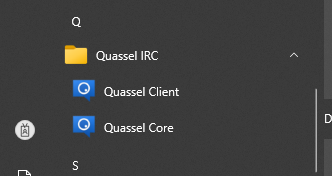
Quassel monilithic icon not added to menu in windows
0%
Description
Hi,
In windows 10, I installed quassel as user only, with all 3 items selected. (mono, client and core). Client and core icons appeared as expected, but monolithinc client did not. However, client runs and works as expected when running from the run command dialog.

History
#1 Updated by stephen41diaz about 2 months ago
bot wrote:
Hi, https://www.leewaytoll.com
In windows 10, I installed quassel as user only, with all 3 items selected. (mono, client and core). Client and core icons appeared as expected, but monolithinc client did not. However, client runs and works as expected when running from the run command dialog.
Confirmed on Windows: the monolithic build installs but doesn’t add its Start menu icon. Manual shortcut creation works as a workaround until packaging is fixed
#2 Updated by emm022stone 27 days ago
bot wrote:
Hi,
In windows 10, I installed quassel as user only, with all 3 items selected. (mono, client and core). Client and core icons appeared as expected, https://www.myaarpmedi.care but monolithinc client did not. However, client runs and works as expected when running from the run command dialog.
the Monolithic Client shortcut simply wasn’t created during the per-user installation. Since it runs correctly from the Run dialog, the installation itself seems fine. You could try creating a shortcut manually to the same executable and see if that resolves it.
#3 Updated by herringbur 17 days ago
football games bring the excitement of the world's most popular sport directly to your browser. Whether you enjoy fast-paced matches, penalty shootouts, skill challenges, or football management, there are plenty of games to choose from.